tiny.zurich: Zurich and its neighbours as one hand-drawn-looking isometric map: from Kloten airport to Thalwil, from Dietikon to the Greifensee. You can zoom from the whole metro area down to single houses.
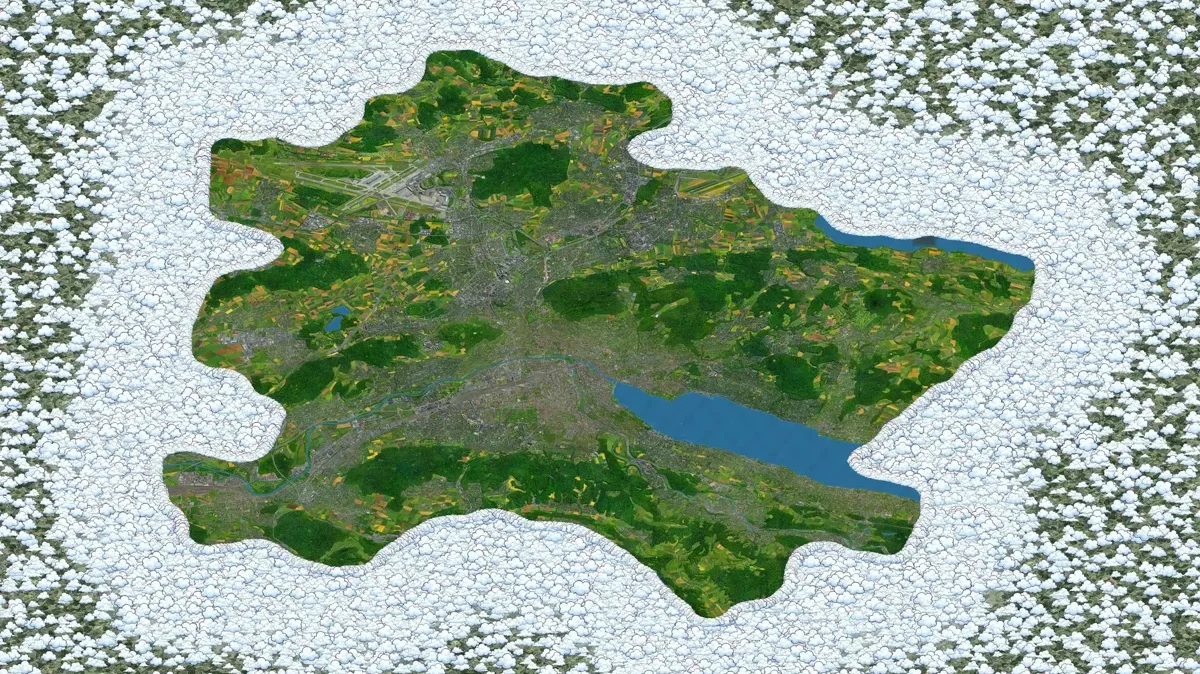
- 11,862 painted tiles of 512 px
- 0.29 m per pixel at full zoom
- ~650 searchable places
How it was made#
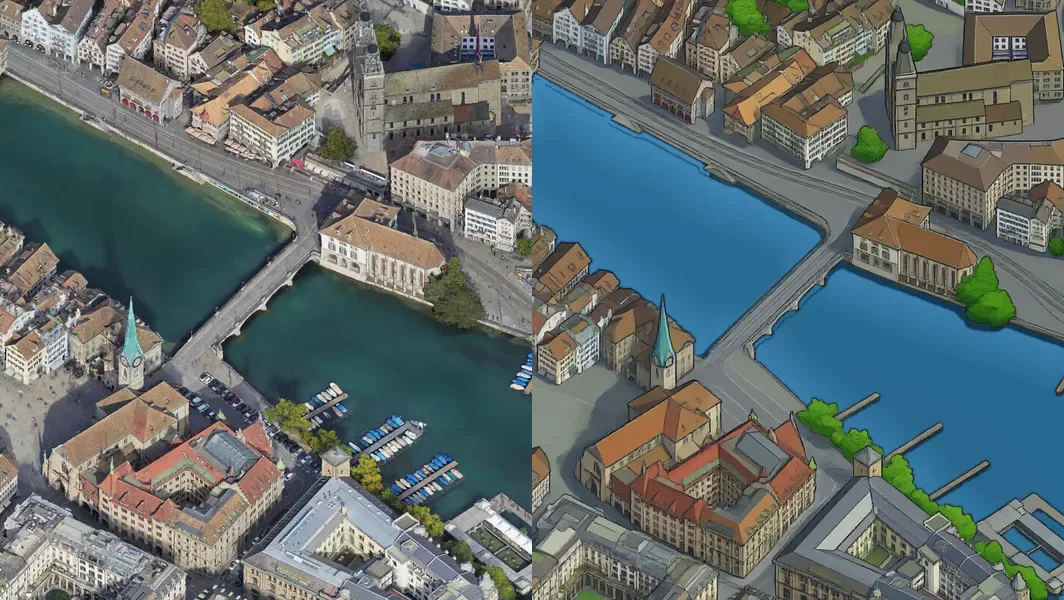
- Render. The city was rendered from a photorealistic 3D model in one fixed camera, facing north-east and tilted 45°, in 767 shots.
- Teach. About 600 crops were redrawn as pixel art by an image model, then checked by hand and against swisstopo's water and building data. Drawings that invented lakes or buildings were thrown out.
- Learn. A smaller open image model was fine-tuned on those pairs until it could turn any render crop into the same style.
- Paint. It then painted the whole map in overlapping windows on cloud GPUs, with finished neighbours held fixed, so roads, rivers and rooftops continue across every tile.
- Fix. An automatic scan and a second-opinion model flagged odd tiles; each repair was approved by eye. The lakes were evened out, the seams between painting blocks levelled, and a ring of clouds drawn around the edge.
- Finish by hand. Trams, trains, the Panta Rhei, the funiculars, SWISS planes and the little flags were drawn separately and placed one by one.
Things to look for#
Switch on Trams, trains, boats & planes and zoom in: the trams run in the classic blue and white. A few things on the lake were left as the model drew them, on purpose. Happy hunting.
Inspired by#
tiny.london and isometric.nyc, which worked out the method this map follows.
tiny.zurich: how it happened
A short walk-through of how the map was made, from inspiration to feasibility to a live page.
Feasibility: can tiny.london be redone for Zurich?#
It started when I stumbled across tiny.london's "how" page, read it, and then snooped around the isometric.nyc source it was inspired by. London was built in four parts:
- Render the city from a 3D model in one fixed isometric perspective (Google's Photorealistic 3D Tiles make this possible).
- Have a strong (frontier) image model redraw an "interesting" subset of the city as pixel art (the "teacher").
- Fine-tune an open image model on those pairs (the "student").
- Draw the whole map with the student, with every window agreeing with its neighbours (joint sampling).
It turned out that Zurich (and all of Switzerland) checked these boxes:
- Google Photorealistic 3D Tiles for the render: the only 3D model with real roof and facade texture at city scale.
- swisstopo open data (swissTLM3D, swissBOUNDARIES3D, swissNAMES3D, the height service) as ground truth: water outlines, borders, names, heights. That beats what London had available.
Conclusion and side note: as this was being planned, I was in the middle of moving around the world, so the interruptions of an AI-assisted workflow were a fun change from packing my life into suitcases (sometimes it was the other way round, and packing was a break from building this). So: the project was feasible, with some effort and a budget of roughly $100–150.
Area and camera#
Obviously, I knew I wanted Zurich, the lakeside, the Uetliberg and, if possible, the airport. More municipalities were added to give the end result a nicer shape. But the shape was determined more by the camera angle. I was torn between north-east and south-south-east; my main concern was where the Uetliberg would hide parts of the map. In the end I went for facing north-east, tilted 45°, at 0.293 m per pixel. Coordinates are converted from LV95 to WGS84 with pyproj, with a geoid offset of +47.5 m, so swisstopo outlines land on the Google render to within a few pixels.
Rendering the city#
For the renderer, I used three.js with 3d-tiles-renderer and one orthographic camera driven by Playwright. Each shot is a frustum shift of 2,048 pixels. A ledger counted root requests against the Google Maps free tier; the total came to just 27. After raising the tile cache to 3 GB and working around the fact that WebGL silently downscales large canvases, we had 767 shots, 0 holes, on a grid of 43 × 28 shots.
"Ground" truth from swisstopo#
Using swissTLM3D, extracted for the area plus a 4 km buffer, it was possible to project the water polygons into canvas pixels, plus a list of hard places. These were used to check the teacher drawings, to build the lake repaint, and to place every pin and outline in the viewer.
The teacher: Nano Banana Pro#
For the teacher we went for a very good model, and since I had been using the Gemini family thanks to the free offer for students in Canada (I guess the promo worked), I decided to go with that. I beamed over the oh-so-valuable $70 in the form of 100 CAD prepaid, with a script cap of $68, and used the manual interface (Pro for free as a student, remember) to fine-tune the prompt. Automatic checks made sure that nothing went off the rails, and I reviewed the pilot as well as the targeted batches on contact sheets. The main failure mode was clear early on: water appearing where there was none, which in later stages turned into a recurring theme of shadowy trees ↔ algae water. In the end we had 578 accepted redraws, plus 51 extra crops of high-rises, stations and building sites.
Picking the training set#
- Diversity: DINOv2 embeddings, k-means into 48 groups, quotas proportional to the square root of group size, plus manual picks for landmarks.
- Hold-outs that were never trained on: Oerlikon, the Dübendorf airfield, the Wollishofen shore.
- Training pairs: in isometric.nyc's format, the render with a 2 px red outline plus the infill prompt. Each redraw gives three examples (full 1024, full 512, one partial "infill" variant), so 1,734 examples.
The student: Qwen-Image LoRA#
The model of choice was Qwen-Image-2.1-Turbo (int8, 8 sampling steps), fine-tuned with ai-toolkit on RunPod (A40), LoRA rank 32. In a v0 version, trained on 138 redraws, the airfield came out well, but the city still looked like the photo, i.e. not really pixel art. That changed with v1: 5,000 steps on the full set. Now the style was learned; an 8,192 px pilot at strength 1.25 looked very good, with seam scores of 1.04 / 0.92. Weak spots remained: Oerlikon stayed photo-like, the Kleiner Hafner shoal turned into an island, and moored boats vanished. Lastly, v2 (2,000 more steps with the high-rise and station crops added) brought a slight improvement and was chosen for the full map at strength 1.25.
Painting the whole map#
To paint the whole map, we used MultiDiffusion with RePaint-style pinning; the goal was to keep the image as homogeneous as possible across the tiles and blocks painted in the previous step. Here came the main blunder: an oversight left two H100s idle for an hour. So I stopped the dilly-dallying, tightened the price guard, loaded more money into RunPod and ran it in parallel on four A40s, later three A40s plus one H100. The output was 11,862 tiles of 512 px, a picture of about 86,000 × 56,000 px.
Repairs#
The edge looked quite messed up straight out of the box; on top of that, the student had hallucinated things onto it (including Big Ben). This was fixed by filling missing render areas with the nearest real pixels. Through manual review, I named tiles that needed repair; they were sent to a GPU queue and came back for my approval or refusal. The repair modes were repaint, erase and grow (the latter used for invented lakes that spread across several tiles). More errors were found by scanning all tiles inside the border and getting a second opinion from Gemini Flash (about $1). The lake was repainted on the CPU to remove colour edges and discolourations: Google's texture seams in the water (the straight-edged polygon off the Zürichhorn) and the photo-like shallows are gone. Boats, piers, bridges and real islands were kept. The Kleiner Hafner island is now plain lake (RIP). Seam levelling also ran on the CPU. Some easter eggs were kept on purpose.
The edge#
AI-drawn mountains were soon rejected, as they could not get beyond pure tasteslop. The final idea was a ring of clouds that turns into a gradient towards muted countryside, made of field patches from the image itself.
Places, search and landmarks#
What was there to mark on my canvas? I started with the 25 municipalities and the 12 Kreise as outlines, projected with real ground heights from swisstopo so they sit on the painted hills. Next came the landmarks: a curated list of things I remembered from living in Zurich, each with an English sentence, geocoded via OpenStreetMap and the swisstopo address search, and checked by hand. A review tool was used to edit the descriptions of the landmarks by hand (not those of the districts (yet!)).
The activity layer and flags#
To add some soul to the map, there are 108 sprites on it. They are tiny and change nothing about the map, but they make it a personal favourite of mine. Visible are:
- classic blue-and-white Tram 2000s
- S-Bahn and InterCity trains in the SBB palette
- the Panta Rhei
- the Polybahn, Dolderbahn and Rigiblick
- PostAutos
- SWISS A330s
- Swiss flags
As automatic placement was often wrong, I placed and fitted them by hand in a local placement tool.
The viewer#
The viewer uses OpenSeadragon over a WebP Deep Zoom pyramid, with shareable position links and a cute Zurich-lion pin that scales with zoom. The landmark filters use 15 pixel-art category icons, sorted alphabetically.
(i) screen: what the project is, how it was made, and the attribution.
Hosting#
Hosting is split: the viewer (about 1 MB) lives on Vercel, the tiles (about 50,000 WebP files) live on Cloudflare R2, whose free tier has no egress charges. On licensing: this is an art project, not a map product. It credits Google, swisstopo and all other sources, and will be adjusted or taken down if a rights holder objects.